Basic Information
Set up the fundamental details of your agent, which are crucial for internal organization and prompt generation clarity.
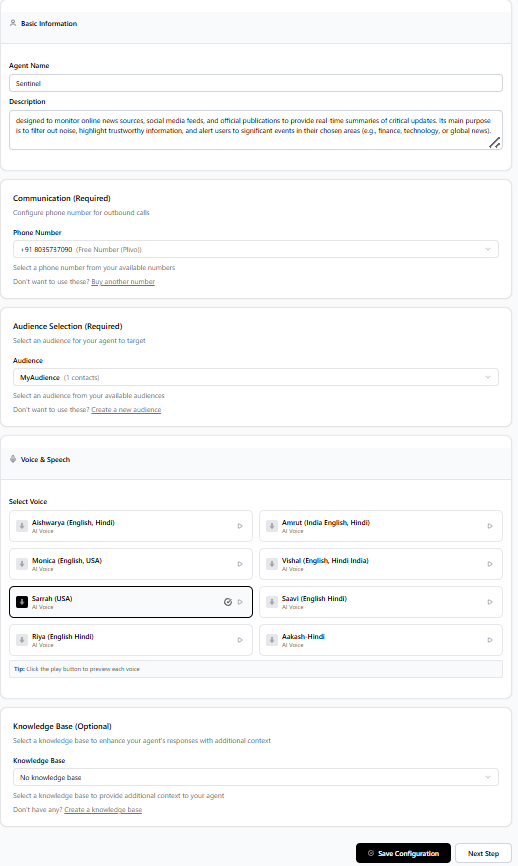
Agent Name
- A unique identifier for your agent, used in the dashboard and reports.
- Should be descriptive, e.g., "Customer Service Agent - Tier 1".
- Helps distinguish agents serving different functions or teams.
Description / Role
- Detailed explanation of the agent's purpose, duties, and limitations.
- Crucial for the AI model to understand its role and tone (used for prompt generation).
- Include target audience and main objectives.
Communication Settings
Configure the agent's style and linguistic preferences to match your brand and provide a consistent user experience.
Voice & Tone Selection
- Choose from professional or friendly voice tones and accents.
- Select voice gender and age characteristics for brand alignment.
- Adjust speaking speed and volume for optimal clarity.
Conversation Style
- Set a formal or casual conversational tone.
- Customize the initial greeting and fallback message.
- Define max response length to ensure concise communication.
Phone & Call Routing
Assign the dedicated phone number and configure its routing logic for incoming and outgoing calls.
Number Assignment
- Assign a dedicated phone number from your available pool.
- Set up time-of-day call forwarding to human agents or voicemail.
- Configure global call routing rules and regional settings.
Advanced Routing
- Implement logic for call escalation based on caller intent/frustration.
- Define a maximum conversation length before routing to a human.
- Set up post-call actions, like data logging or CRM updates.
Audience & Knowledge Base
Integrate data sources and define audience variables to enable informed, personalized, and accurate responses.
Audience Targeting
- Upload or connect lead lists and define dynamic data variables.
- Use CSV headers to insert personalized content (e.g., caller name, account status).
- Set audience-specific conversation flow overrides.
Knowledge Base Integration
- Connect to internal documentation for factual responses.
- Configure confidence thresholds for information retrieval.
- Set up fallback responses when the KB cannot provide an answer.
Advanced Configuration
Fine-tune behavior, integrate external systems, and configure advanced error handling.
Behavior Settings
- Configure escalation rules and human agent handoff triggers.
- Adjust maximum retry attempts for failed data lookups.
- Set specific response time preferences (e.g., faster responses for simple queries).
Integration Options
- Set up connections to external CRM, ticketing, or billing systems.
- Define webhook URLs for real-time data exchange (API connections).
- Configure data collection settings and compliance checks.
Configuration Best Practices
Follow these guidelines to achieve the highest extraction rates and superior customer experience.
Initial Setup Check
- Ensure the agent description clearly defines the goal and tone.
- Always choose a voice that sounds natural and professional.
- Define clear, measurable data collection criteria from the start.
Monitoring & Iteration
- Monitor analytics for conversational drop-off points.
- Review logs weekly to identify error handling opportunities.
- Continuously update the knowledge base and refine prompts based on real call data.